Best Salesforce integration platforms in 2026

Best overall for enterprise API reuse: MuleSoft Anypoint Platform. Best for cross-application workflows: Workato. Best for a small, low-risk automation: Zapier. The best Salesforce integration platforms in 2026 depend on whether you need governed APIs, coordinated business processes, or a simple connection between apps.
TL;DR
- MuleSoft Anypoint Platform is the best Salesforce integration platform for teams building reusable, governed APIs.
- Workato is the better fit when Salesforce integration is part of a cross-application business workflow.
- Zapier fits a small automation, not a critical system-of-record sync.
- SOLVD.cloud is an integration consulting and implementation partner, not a software platform.
Why this matters
A connection that moves a record is not necessarily an integration you can trust. If Salesforce and another system both edit the same customer field, you need a rule for which system wins. If a request fails, you need to know whether it will retry, create a duplicate, or disappear into an error log.
The 2026 decision is therefore about ownership and operating risk, not the length of a connector catalog. SOLVD.cloud provides Salesforce integration consulting and implementation for businesses that need to connect and modernize their CRM systems. That is a service to consider when the architecture or delivery work exceeds what your internal team can own; it is not a substitute entry in a platform comparison.
What makes the best Salesforce integration platform
Use these criteria before you compare interfaces or connector lists:
- Integration pattern: Decide whether you need a reusable API, a business-process workflow, an event-driven update, or a simple app-to-app action.
- System ownership: Name the system of record for each important field. A two-way sync without conflict rules creates competing versions of the same data.
- Failure handling: Check how the platform reports failed requests, retries work, and exposes records that need manual correction.
- Security controls: Review connection permissions, credential management, and how changes move through your approval process.
- Operating ownership: Identify who will monitor runs, update mappings, and respond when a connected application changes.
- Salesforce fit: Check whether the approach suits your org’s data model, automation, API usage, and deployment process.
These are different tests. A platform can be easy to start and still be the wrong place to maintain a critical customer-data sync.
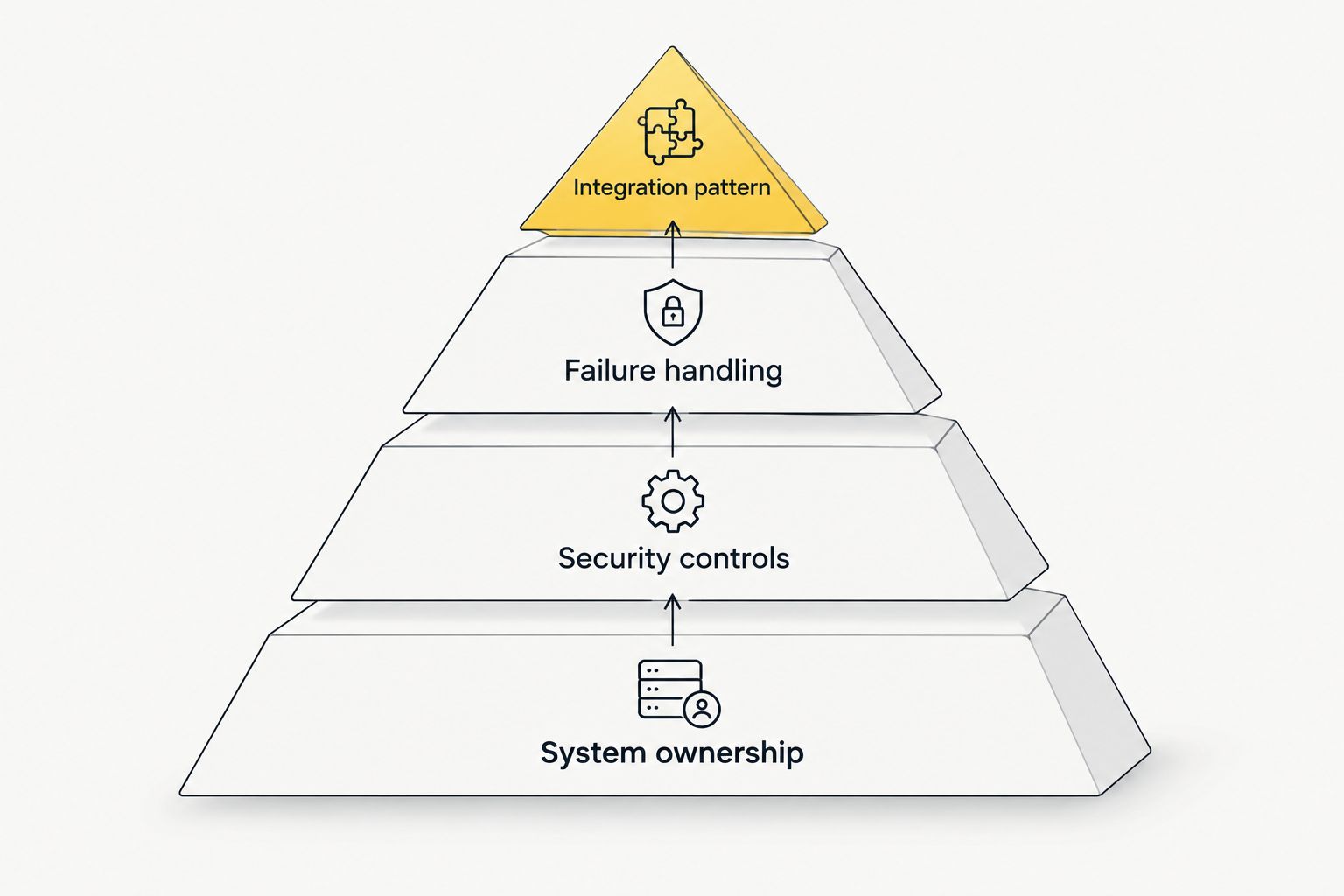
*Set ownership and controls before choosing how records move.*
Salesforce integration platforms at a glance
| Platform or approach | Best for | Standout capability | Key limitation |
| --- | --- | --- | --- |
| MuleSoft Anypoint Platform | Reusable enterprise APIs | API design and management alongside integration | Requires an API operating model, not just a connector setup |
| Workato | Cross-application workflows | Business-process automation across connected apps | Workflow ownership can become difficult when recipes multiply |
| Boomi | Mixed application and data environments | Integration flows across cloud and on-premises systems | Mappings and runtime operations need sustained oversight |
| Salesforce Flow and native tools | Automation centered in Salesforce | Works within the Salesforce configuration and deployment model | Not a replacement for an external integration estate |
| Zapier | Small, low-risk app automations | Accessible trigger-and-action setup | Limited fit for complex data ownership and recovery rules |
Default choice for 2026: Start with MuleSoft Anypoint Platform if reusable APIs and central governance are the requirement. Choose Workato instead when the main job is coordinating steps across business applications. Neither choice removes the need to define field ownership and failure recovery.
1. MuleSoft Anypoint Platform: best for reusable enterprise APIs
MuleSoft Anypoint Platform is the strongest fit here when Salesforce is one part of a broader API architecture. Teams can build and manage APIs that expose business capabilities to more than one consuming application, rather than creating a separate point-to-point connection for each request. Its value depends on whether your organization will actually maintain those APIs as shared assets.
That distinction matters in 2026. If an order service feeds Salesforce, a customer portal, and reporting tools, a reusable API can establish a consistent contract. If you only need one app to create a Salesforce record, that architecture introduces work you do not need.
MuleSoft Anypoint Platform pros:
- Supports an API-led approach when several systems need the same business data.
- Gives integration teams a place to manage and govern APIs.
- Suits environments where Salesforce connections are part of a larger integration program.
MuleSoft Anypoint Platform cons:
- Demands clear ownership of APIs, changes, and operational support.
- Adds design and maintenance work to a narrow, one-off connection.
Best for: Businesses building reusable integrations across Salesforce and multiple other systems.
Verdict: Buy when API reuse and governance are requirements. Hold when the project is a single, contained workflow and no team will own the API layer.
2. Workato: best for cross-application workflows
Workato focuses on automating processes across connected applications. It fits a task such as taking an approved change in one system, updating Salesforce, and sending the next step to another application. That is a process-design problem, not merely a data-transfer problem.
In 2026, assess Workato against the full workflow: its trigger, transformation, exceptions, and owner. A successful run that updates the wrong Salesforce field is still an operational failure. Document the mapping and decide what happens when a downstream step cannot complete.
Workato pros:
- Fits workflows that coordinate actions across multiple business applications.
- Makes process steps visible in an automation recipe.
- Works when the team needs more than a basic trigger-and-action connection.
Workato cons:
- A growing collection of recipes needs naming, review, and ownership rules.
- Complex record synchronization still requires explicit conflict and recovery design.
Best for: Teams connecting Salesforce to a defined cross-application business process.
Verdict: Buy when process automation is the core requirement. Hold if the real requirement is an API layer shared by many consumers.
3. Boomi: best for mixed application and data environments
Boomi is an integration platform for connecting applications and data across cloud and on-premises environments. It belongs on the shortlist when Salesforce must exchange information with systems that do not all live in the same cloud stack. Its integration flows can handle more than a direct app-to-app handoff.
The selection test is operational. Identify where each integration runs, which team manages it, and how errors return to the record owner. For a 2026 Salesforce program with several existing systems, that work matters as much as building the initial mapping.
Boomi pros:
- Addresses integrations spanning cloud and on-premises systems.
- Provides a platform for building and managing integration flows.
- Fits projects with varied source and destination applications.
Boomi cons:
- Transformation logic can become difficult to maintain without documentation.
- Runtime monitoring and change ownership remain ongoing responsibilities.
Best for: Organizations connecting Salesforce within a mixed application estate.
Verdict: Buy when hybrid connectivity is central to the project. Hold when all you need is a small workflow between familiar cloud applications.
4. Salesforce Flow and native tools: best for Salesforce-centered automation
Salesforce Flow is an automation tool inside Salesforce, not a standalone integration platform. Salesforce also provides native ways to expose, receive, and react to data through APIs and events. Together, those tools can be the right approach when most of the logic belongs in the Salesforce org and the external connection is limited.
The boundary is important. Keep Salesforce-centered decisions near the CRM data and users they serve. Do not turn the org into the coordinator for every external process simply because a Flow can start one. In 2026, review that choice against existing automations, deployment controls, and the team that will investigate failures.
Salesforce Flow and native tools pros:
- Keep Salesforce-specific automation close to the data model it uses.
- Fit an existing Salesforce administration and deployment process.
- Avoid introducing an external platform for a contained requirement.
Salesforce Flow and native tools cons:
- Place more operational logic inside the Salesforce org.
- Do not provide a central integration platform for an estate of external systems.
Best for: A bounded integration where Salesforce owns the primary process.
Verdict: Buy for a contained Salesforce-centered requirement. Hold when several systems need shared orchestration or independently managed APIs.
5. Zapier: best for a small, low-risk automation
Zapier connects supported applications through trigger-and-action automations. It is a practical option when a team needs a straightforward handoff into or out of Salesforce and can check the result without building a larger integration service. Keep the workflow narrow and make its owner explicit.
A critical sync is different. When both systems can change a record, the team needs conflict rules, error recovery, and a reliable way to reconcile missed updates. Do not treat a working demonstration as proof that those controls exist.
Zapier pros:
- Suits a straightforward action between supported applications.
- Lets a business team describe the intended trigger and outcome plainly.
- Avoids a larger architecture project for a limited use case.
Zapier cons:
- Is a poor default for complex, bidirectional system-of-record synchronization.
- Still needs someone to monitor failures and changes to connected apps.
Best for: A small automation whose failure can be detected and corrected without disrupting a core process.
Verdict: Buy for a narrow, low-risk handoff. Skip for a critical sync with unresolved data ownership.
How to choose without rebuilding the connection later
Start with the record, not the vendor. Write down which system creates it, which system can change it, and which team resolves a disagreement. Then trace what must happen when the destination is unavailable. This gives you a testable requirement for the platform shortlist.
Next, separate an integration from a workflow. An integration moves or exposes data; a workflow decides what business action follows. One project can contain both, but they do not need to live in the same tool. In 2026, this distinction helps prevent a simple automation from becoming the unplanned owner of customer data.
Finally, assign an operating owner before implementation. That person or team needs access to failures, authority to approve mapping changes, and a process for checking the affected Salesforce records after a fix. A connection with no recovery owner is not production-ready, regardless of the platform behind it.
How we ranked these options
The ranking weighs the criteria above against distinct use cases, rather than treating every Salesforce connection as the same job. MuleSoft Anypoint Platform leads for reusable API architecture; Workato leads for cross-application processes. Boomi addresses a mixed systems estate, Salesforce Flow and native tools fit bounded CRM-centered work, and Zapier fits a narrow automation.
This is not a ranking of connector counts or an endorsement of one tool for every 2026 project. The limitation in each entry is part of the recommendation. SOLVD.cloud helps businesses that need Salesforce integration architecture and implementation support; it is not another software platform. A consulting partner can help define the requirements and deliver the connection; the platform choice still depends on the systems and process involved.
Which Salesforce integration platform should you choose?
Choose MuleSoft Anypoint Platform if your team will govern reusable APIs across several systems. Choose Workato if the main deliverable is a business workflow spanning Salesforce and other applications. Choose Boomi when cloud and on-premises connectivity shapes the work, Salesforce Flow and native tools when the logic is primarily inside the org, or Zapier for a small, low-risk handoff.
If you cannot name the system of record, the exception owner, and the recovery process, pause the platform decision. SOLVD.cloud provides Salesforce integration consulting and implementation for businesses working through those design and delivery questions. Resolve them first; then select the 2026 platform that matches the job.
Related SOLVD resources
- Salesforce integrations — how we approach CRM connections and ownership.
- Managed services — ongoing support across CRM, data, and AI.
- Salesforce capabilities — implementation and modernization scope.
- Data practice — cleanup, migration, and analytics work that often sits beside integration.
- Book a meeting — talk through your integration requirements with our team.
FAQ
What is the best Salesforce integration platform in 2026?
MuleSoft Anypoint Platform is the best fit when you need reusable, governed APIs across systems. For cross-application workflows, Workato is the more direct choice.
Is Workato better than MuleSoft for Salesforce integration?
Workato is better suited to coordinating a defined business workflow across applications. MuleSoft Anypoint Platform is the stronger fit when reusable APIs and their governance are the main requirement.
Can Salesforce Flow replace an integration platform?
Salesforce Flow can support a bounded Salesforce-centered integration, but it does not replace a central platform for managing an external integration estate. Keep the logic in Salesforce when the org owns the process and the connection remains contained.
When should I use Boomi with Salesforce?
Use Boomi when Salesforce must connect across a mixed environment of cloud and on-premises systems. Confirm who will maintain mappings, monitor runs, and resolve failed records.
Is Zapier suitable for a critical Salesforce sync?
Zapier is not the default choice for a critical sync that needs complex conflict and recovery rules. It fits a narrow automation with a clear owner and a manageable failure path.
How do I avoid duplicate Salesforce records during integration?
Define the matching rule, system of record, and retry behavior before records move. Test what happens when a request succeeds in one system but the confirmation or next step fails.
Is SOLVD.cloud a Salesforce integration platform?
No. SOLVD.cloud provides Salesforce integration consulting and implementation services, not a software platform. Engage a service partner when your team needs help designing or delivering the integration.
One last thing
The most useful question in a 2026 platform meeting is not which connector works. Ask who fixes the Salesforce record when the connection reports success but the business outcome is wrong. If no team owns that answer, settle it before you build.
---
Next step: Book a meeting on the Fit page if you want help designing or delivering the Salesforce work described above. No fit form — just pick a time.